WiFi Study: No More Guesswork!

The most costly mistake in a WiFi project is also the most common: buying a box of access points, installing them where RJ45 sockets are available, and crossing your fingers that "it works." In the industry, this is called "Plug & Pray" (Plug and Pray).
The problem? Radio waves are invisible, yet they follow strict physical laws. Ignoring them inevitably leads to user complaints, slow performance, and disconnections.
Here's why deploying a network without prior study is a gamble you're sure to lose, and why pre-engineering is your best investment.
1. The Myth of "More Access Points, Better Performance"
This is Misbelief #1. If the WiFi signal is weak, the reflex is often to add more access points.
The reality: Too many access points kill WiFi. If you install them too close to each other without adjusting their power, they will "shout" simultaneously on the same frequencies. This is known as Co-Channel Interference (CCI). For your computer, it's like trying to listen to a conversation in a room where everyone is shouting. Result: you have four bars of signal, but the internet is unusable.
A WiFi study calculates the exact placement so that the access points complement each other without interference.
2. Walls Are Not Transparent (Signal Attenuation)
You cannot guess how waves will propagate just by looking at a floor plan.
A plasterboard partition allows the signal to pass through.
A reinforced concrete elevator shaft blocks it completely.
A metal shelving unit in a warehouse makes the signal bounce everywhere (multipath).
Modern "anti-UV" tinted glazing can block WiFi as effectively as a brick wall.
The WiFi study (notably the predictive study) simulates these materials to precisely predict where the signal will stop.
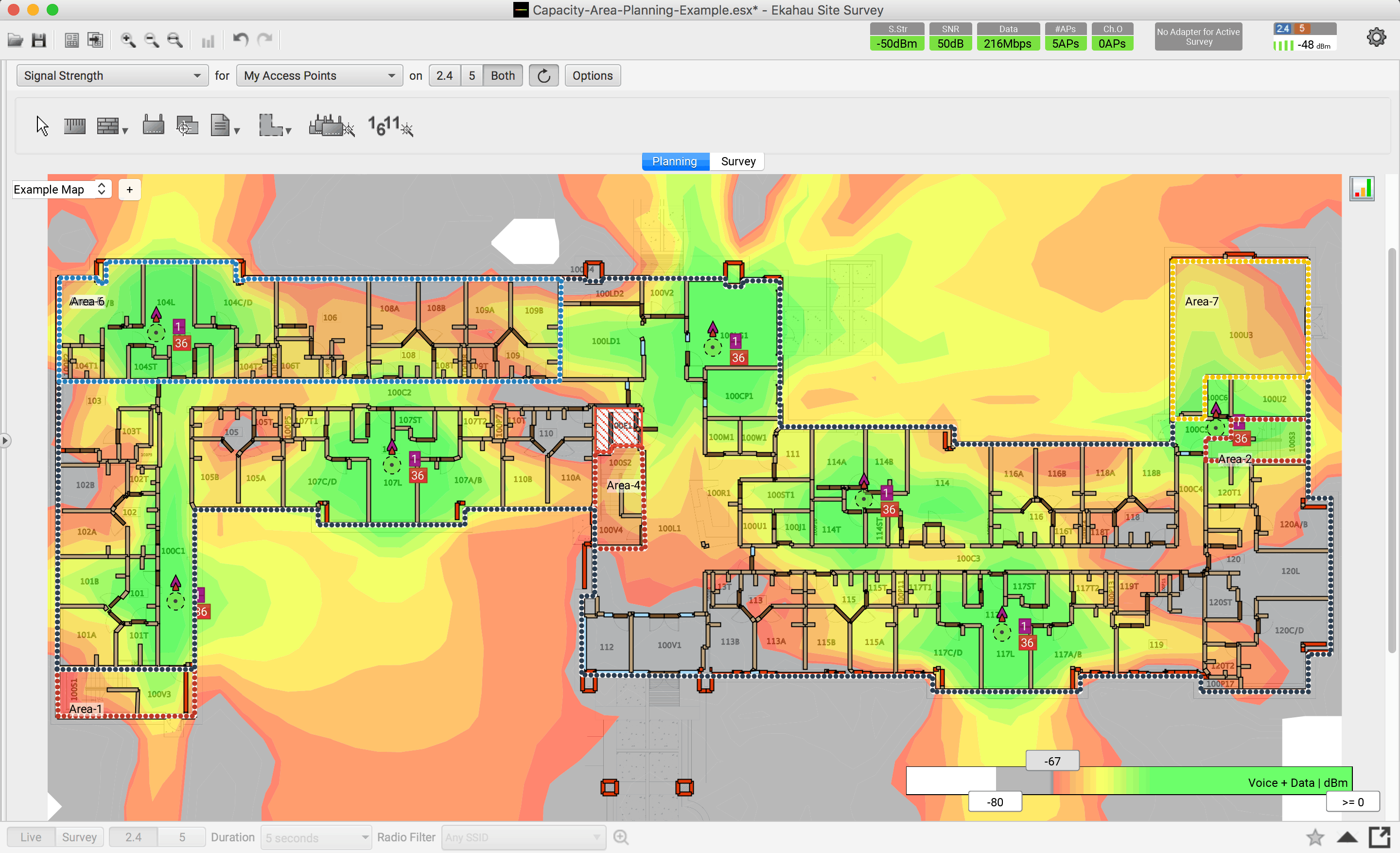
3. Ensuring Roaming (Seamless Transition)
In offices or a warehouse, users move around. They need to switch from Access Point A to Access Point B without their Teams call dropping or their scanner losing connection.
If access points are installed randomly, it often creates "Sticky Client" zones: your device desperately clings to a distant access point (with poor signal) when it is under another (which it ignores). A well-conducted study adjusts transition thresholds to ensure a smooth handover.
4. Capacity vs. Coverage: The Density Trap
Covering an area is easy. Supporting 50 users in that area is another story. Placing one access point on a meeting room ceiling may suffice for coverage. But if 20 people start streaming videos simultaneously, that single access point will collapse.
The WiFi study considers not just square meters but usage. It determines: "Here, two directional access points are needed to handle the load, not a single classic omnidirectional one."
5. Economic Argument: Getting It Right the First Time
It's mathematical:
Without a study: You buy 10 access points "randomly." It doesn't work. You need to pay a technician to move the wiring (expensive), buy 2 additional access points, or worse, realize you bought 4 extra that interfere with the network.
With a study: You know you need exactly 8 access points, placed in specific locations. The wiring is done correctly from the start.
The cost of the study is always less than the cost of redoing a poorly designed network.
Conclusion
WiFi is not magic; it's engineering. A WiFi study (predictive or on-site "AP-on-a-Stick") is the architectural plan for your network. Would you build a house without plans? Don't build your digital network without a study.
The most costly mistake in a WiFi project is also the most common: buying a box of access points, installing them where RJ45 sockets are available, and crossing your fingers that "it works." In the industry, this is called "Plug & Pray" (Plug and Pray).
The problem? Radio waves are invisible, yet they follow strict physical laws. Ignoring them inevitably leads to user complaints, slow performance, and disconnections.
Here's why deploying a network without prior study is a gamble you're sure to lose, and why pre-engineering is your best investment.
1. The Myth of "More Access Points, Better Performance"
This is Misbelief #1. If the WiFi signal is weak, the reflex is often to add more access points.
The reality: Too many access points kill WiFi. If you install them too close to each other without adjusting their power, they will "shout" simultaneously on the same frequencies. This is known as Co-Channel Interference (CCI). For your computer, it's like trying to listen to a conversation in a room where everyone is shouting. Result: you have four bars of signal, but the internet is unusable.
A WiFi study calculates the exact placement so that the access points complement each other without interference.
2. Walls Are Not Transparent (Signal Attenuation)
You cannot guess how waves will propagate just by looking at a floor plan.
A plasterboard partition allows the signal to pass through.
A reinforced concrete elevator shaft blocks it completely.
A metal shelving unit in a warehouse makes the signal bounce everywhere (multipath).
Modern "anti-UV" tinted glazing can block WiFi as effectively as a brick wall.
The WiFi study (notably the predictive study) simulates these materials to precisely predict where the signal will stop.
3. Ensuring Roaming (Seamless Transition)
In offices or a warehouse, users move around. They need to switch from Access Point A to Access Point B without their Teams call dropping or their scanner losing connection.
If access points are installed randomly, it often creates "Sticky Client" zones: your device desperately clings to a distant access point (with poor signal) when it is under another (which it ignores). A well-conducted study adjusts transition thresholds to ensure a smooth handover.
4. Capacity vs. Coverage: The Density Trap
Covering an area is easy. Supporting 50 users in that area is another story. Placing one access point on a meeting room ceiling may suffice for coverage. But if 20 people start streaming videos simultaneously, that single access point will collapse.
The WiFi study considers not just square meters but usage. It determines: "Here, two directional access points are needed to handle the load, not a single classic omnidirectional one."
5. Economic Argument: Getting It Right the First Time
It's mathematical:
Without a study: You buy 10 access points "randomly." It doesn't work. You need to pay a technician to move the wiring (expensive), buy 2 additional access points, or worse, realize you bought 4 extra that interfere with the network.
With a study: You know you need exactly 8 access points, placed in specific locations. The wiring is done correctly from the start.
The cost of the study is always less than the cost of redoing a poorly designed network.
Conclusion
WiFi is not magic; it's engineering. A WiFi study (predictive or on-site "AP-on-a-Stick") is the architectural plan for your network. Would you build a house without plans? Don't build your digital network without a study.
Category
Infrastructure & Networks
Infrastructure & Networks
Infrastructure & Networks
Latest news and trends


Looking to join a company where Wi-Fi expertise makes a difference?
At Meltwain, we value talents who are passionate about networking, service quality, and innovation. Join a certified team (CWNE, ECSE, Ubiquiti...) and contribute to exciting technical projects in Luxembourg and Europe.

Looking to join a company where Wi-Fi expertise makes a difference?
At Meltwain, we value talents who are passionate about networking, service quality, and innovation. Join a certified team (CWNE, ECSE, Ubiquiti...) and contribute to exciting technical projects in Luxembourg and Europe.
Looking to join a company where Wi-Fi expertise makes a difference?
At Meltwain, we value talents who are passionate about networking, service quality, and innovation. Join a certified team (CWNE, ECSE, Ubiquiti...) and contribute to exciting technical projects in Luxembourg and Europe.